Franklin Sensors
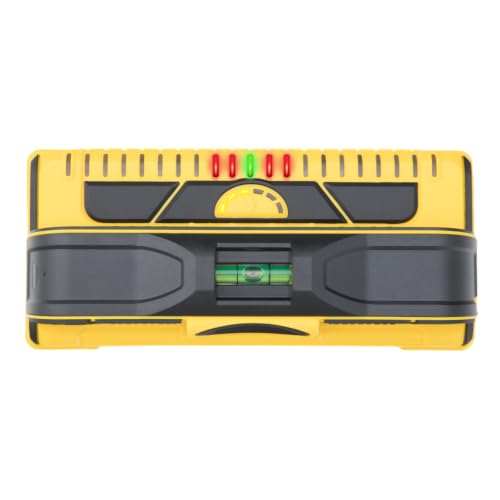
Franklin Sensors ProSensor MAX 13-Sensor Stud Finder, 2.5-in Deep Detection | High Accuracy Wood and Metal Stud Finder Wall Scanner For Thick Walls, Plaster, and OSB, Made in the USA, Built-in Level
Disclosure: We may earn a commission when you buy through links on this page, at no extra cost to you. As an Amazon Associate I earn from qualifying purchases. Learn more
Highlights
- SIGNIFICANTLY DEEPER SENSING: With 13 larger sensors, the MAX stud detector accurately scans through two or more layers of drywall, plaster, OSB, plywood, MDF, and large tile with a max detection depth of 2.5 in
- ACCURATE: More sensors = More accuracy. Other electronic stud finders have 1 or 2 sensors. The ProSensor MAX has 13, making it the best deep scan stud finder on the market
- EASY: No calibration required. Simply press and hold the button to begin scanning. Unlike other wall stud finders that give false readings, the ProSensor MAX lets you start scanning anywhere, even over a stud
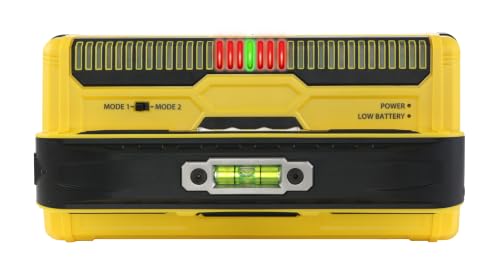
- SHOWS FULL WIDTH OF STUDS: Unlike basic stud finders that only find stud edges, the ProSensor MAX detects the full width of studs. The precision LED display shows single or double studs, and the middle LED will turn green to indicate stud centers
- TWO DETECTION MODES: In mode 1, the ProSensor MAX operates as a normal stud finder for drywall. Switch to mode 2 for deep scanning through thick or tough walls
Why You'll Love It
- Thirteen larger sensors detect stud positions through wall materials up to 2.5 inches deep
- Scans through multiple layers of drywall, plaster, OSB, plywood, MDF, and large tile
- Starts scanning without calibration, including when positioned directly over a stud
- LED display reveals full stud width, including single and double studs
- Green center indicator helps identify the middle of a detected stud
- Two scanning modes accommodate ordinary drywall and deeper scanning through thicker walls
Pros
- +13-sensor detection system
- +Up to 2.5-inch detection depth
- +No calibration required
- +Full-width stud indication
- +Built-in level
Cons
- -Designed around stud detection rather than general wall scanning
- -Two dedicated scanning modes to manage
Detailed Review
The Franklin Sensors ProSensor MAX stud finder is aimed at homeowners and renovation enthusiasts who need to locate studs behind thicker or layered wall surfaces. Its defining feature is a 13-sensor detection system with a maximum sensing depth of 2.5 inches. That gives it a specific role beyond locating studs through ordinary drywall: it is also designed to scan through materials such as plaster, OSB, plywood, MDF, and large tile. If your projects involve walls with multiple layers or less straightforward surfaces, that deeper scanning capability is the main reason to consider this model.
The sensor arrangement is central to how this device communicates its findings. Rather than simply indicating a stud edge, the ProSensor MAX displays the full width of the detected stud through its precision LED display. It can also indicate single or double studs, while the middle LED turns green to identify the stud center. This gives shoppers more information about the position of a stud than an edge-only indication would provide. For anyone who needs to identify where a stud begins, ends, and centers, that full-width display is a meaningful part of the design.
Getting started is straightforward. The device requires no calibration, and scanning begins by pressing and holding its button. The seller also describes the ability to begin scanning anywhere, including directly over a stud, which removes a separate positioning step from the stated operating process. Two detection modes give it additional flexibility: mode one handles ordinary drywall scanning, while mode two is intended for deeper scanning through thicker or tougher wall surfaces. The built-in level adds another feature to the overall design.
The main trade-off is that this is a specialized electronic stud finder with a feature set centered on detecting stud positions and widths. Its two modes also mean users need to select the appropriate scanning approach for the wall they are working with. The 2.5-inch figure is a maximum detection depth, not a promise that every listed material or wall construction will produce identical results. Choosing the deeper mode is part of using its capabilities appropriately.
Verdict: Buy this stud finder if you regularly work with plaster, layered wall surfaces, OSB, or other thicker materials and value a display that identifies full stud width and center position. If your needs are limited to straightforward drywall scanning, a simpler stud finder may be a more suitable choice.
Who Should Buy It
A great fit if you:
- Work on renovation projects involving plaster walls and want a scanner designed for deeper detection.
- Need to locate studs behind multiple layers of drywall, plywood, MDF, or other listed materials.
- Prefer seeing the full width of a stud instead of relying only on an indication of its edge.
- Want a device that identifies the center of a stud through a dedicated green LED indicator.
- Value starting a scan without performing a separate calibration step before each use.
Consider something else if you:
- Only need a basic solution for ordinary drywall and would prefer a simpler, less specialized stud finder.
- Want a general-purpose wall scanner rather than a device focused on locating wood and metal studs.
Before You Buy
Confirm on the listing:
- Check whether your wall construction falls within the listed materials, including drywall, plaster, OSB, plywood, MDF, or large tile.
- Consider the thickness and number of layers in your walls, then compare them with the stated maximum detection depth of 2.5 inches.
- Check the product dimensions and confirm that its physical size is suitable for the storage space you intend to use.
- Review the current package details to confirm what is included, particularly if you expect additional accessories or documentation.
How to compare your options: For this type of product, prioritize detection depth, the wall materials it is designed to scan, and how clearly it communicates stud position. The ProSensor MAX combines 13 sensors with two scanning modes and a display that identifies full stud width and center position. Compare those features with the actual surfaces and level of positioning detail your projects require. Also consider whether the built-in level and calibration-free operation are features you will regularly use rather than simply attractive additions.
Getting the Most From It
Start by identifying the wall material you intend to scan. Choose the ordinary drywall mode for standard drywall work and the deeper scanning mode when working through thicker or tougher wall constructions. Matching the mode to the wall is an important part of using the device as intended.
To begin, press and hold the button to start scanning. Calibration is not required, and the stated design allows scanning to begin anywhere, including over a stud. This makes the initial positioning process straightforward without requiring a separate calibration routine.
Pay attention to the complete LED display rather than focusing only on the first illuminated indicator. The full-width display can show single or double studs, while the green middle LED identifies the center. Using these indications together gives you a clearer picture of the detected stud's position.
For ongoing care, follow any instructions supplied with the product. Keep its operating controls and LED display in mind when handling and storing it, and check the manufacturer's guidance for cleaning and maintenance recommendations. If you change between different wall surfaces, remember to reconsider which scanning mode is appropriate before starting again.
FAQ
How deep can the Franklin Sensors ProSensor MAX detect studs?
Its maximum detection depth is 2.5 inches. The deeper scanning capability is intended for thicker wall constructions and multiple layers of listed materials.
Can it find studs behind plaster walls?
Yes, plaster is among the materials identified for scanning. The device is also designed for drywall, OSB, plywood, MDF, and large tile, with a maximum detection depth of 2.5 inches.
Does this stud finder need calibration?
No, calibration is not required. Press and hold the button to begin scanning, and the stated design allows you to start even when positioned over a stud.
Does it show the center of a stud?
Yes, the middle LED turns green to indicate the stud center. Its precision LED display also shows the full stud width and can identify single or double studs.
What is the difference between its two scanning modes?
Mode one is intended for normal drywall scanning, while mode two provides deeper scanning through thicker or tougher walls. Choose the mode that corresponds to the wall surface you are working with.
Product Details
| Brand | Franklin Sensors |
| ASIN | B0D3MDJWVC |