Autel
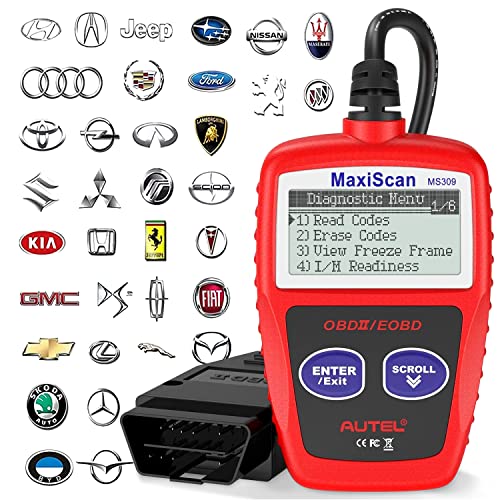
Autel OBD2 Scanner MS309 Universal Car Engine Fault Code Reader, Check Engine Light and Emission Monitor Status, OBDII CAN Diagnostic Scan Tool
Disclosure: We may earn a commission when you buy through links on this page, at no extra cost to you. As an Amazon Associate I earn from qualifying purchases. Learn more
Highlights
- ⚠️【Important Tips Before Purchcase】1. Compatible with standard OBD II vehicles from 1996 onward in the US market. ⚠️2. Due to the Safe Gateway (SGW) / FCA AutoAuth security system, this tool cannot access OBDII modules to clear codes for FCA vehicles (including Chrysler, Dodge, Jeep, etc.) manufactured after 2017. ⚠️And vehicle brands equipped with a SGW are not supported either. ⚠️3. Not support TPMS or other service functions. Only the basic OBDII code reader. Functions not universal, please s-end mes-sage via Ama-zon or 📞autelofficial @ outlook . com📞 to check before order.
- 🧡【How to get a PDF User Manual ?】a) Download directly via Am-azon page from Product guides and documents section. b) Mes-sage us directly via Am-azon or 📞autelofficial @ outlook . com📞, we will send you the PDF version within 0-24 hours. ⚠️📢Warm Tips: 1. It does not support the full engine system, or more advanced prameter display, if need, please consider autel MD906 PRO/ MK808BT PRO etc. 2. Autel MS309 does not listed in Autel US distributor's w-eb. It is only listed in Autel HQ w-eb. If need, please con-tact us to get w-eb.
- 🧡【How to Use The Tool?】The MS309 autel scanner is a plug-and-play tool; it does not require registration. Step 1: With the k~ in the ON position, the engine off. 2. Connect the MS309 OBDII cable to the vehicle's OBDII port. 3. Then, select the on-screen menu to perform the function. 📢Note: Autel MS309 comes with standard OBD II plug, please ensure your vehicle's port is a stardard OBDII (16 Pin) and not loose.
- 🔥【On-Screen DTC Definition, Save Time & Easy To Use】Autel MS309 OBD2 code reader for cars and trucks can retrive and clear generic(P0, P2, P3 and U0), manufacturer-specific(P1, P3 and U1) and pending codes, and display DTCs(Diagnostic Trouble Codes) meanings under the codes based on the built-in database(1000+ codes). Don't need to spend much time to search meanings on the internet. This advanced plug-and-play MS309 scanner saves you time - a must-have obd2 scanner for each DIY car owner.
- 🔥【Retrieve Freeze Frame Data & Vehicle info】The OBD2 scanner MS309 can retrieve freeze frame data, Vehicle Information such as VIN number, Calibration ID(s), Calibration Verification Nos. (CVNs), etc, which is useful to check whether the ECU matches when you are buying a used car.
- 🔥【Turn Off Check Engine Light】When your car detects an emission related problem, Check Engine Light will be turned on. Do you want to spend hundred dollars to turn off this light every time, maybe it's just a gas cap that's not tightened or needs to change bad parts like spark plugs and ignition coils? With Autel MS309 scan tool, you can read code to quickly find out why the check engine light is on and reset it.
- 🔥【Ready For Annual Smog Check】If the OBD II Readiness Monitors on your car are not “Ready”, your car may fail the smog check. MS309 OBD2 scanner can retrieve I/M Readiness status to check the monitors like misfire monitor, fuel system monitor, comprehensive components monitor, catalyst monitor, O2 sensors, EVAP, etc, to help your car ready pass the annual smog check. That way you won't waste time and money on a failed smoke check.
- 🧡【Worry-Free Purchase】The Automotive OBDII car scanner diagnostic tool MS309 comes with a 12-month war-ranty and lifetime fr-ee technical support. Should you require any assistance, feel fr-ee to cont-act us at 📞autelofficial @ outlook . com📞. Our team is available 24/7 throughout the year, and we strive to respond to all inquiries within 24 hours at the latest. ❤️🤠❣️👍📢👉(If the OBD2 code reader is not compatible with your vehicle or does not meet your expectations, please con-tact us at the em-ail addr-ess above. We will provide a full ref-und — no return required.)
Why You'll Love It
- Reads generic, manufacturer-specific, and pending fault codes to help identify check engine light causes
- Displays definitions for more than 1,000 diagnostic trouble codes directly on its screen
- Checks emission monitor readiness so you can review your vehicle's status before a smog inspection
- Retrieves freeze frame data and vehicle identification information, including VIN and calibration details
- Uses a plug-and-play connection with no registration required
- Provides a built-in option to clear supported fault codes and reset the check engine light
Pros
- +Built-in diagnostic code definitions
- +Freeze frame data retrieval
- +Emission readiness monitoring
- +No registration required
- +VIN and calibration information
Cons
- -Basic OBDII functions only
- -No TPMS or service functions
- -Restricted FCA vehicle compatibility
Detailed Review
The Autel MS309 OBD2 code reader is a straightforward engine diagnostic tool for drivers who want to understand a check engine light without immediately relying on someone else to identify the fault code. Its main appeal is the combination of code reading, built-in code definitions, and emission readiness information in a plug-and-play device. Rather than offering a broad collection of vehicle service functions, it concentrates on basic OBDII diagnostics. That makes it a practical option for DIY car owners who want a clearer starting point when an engine warning appears or an annual smog inspection approaches.
One of its most useful features is its ability to retrieve generic, manufacturer-specific, and pending diagnostic trouble codes. The built-in database contains more than 1,000 code definitions, allowing the scanner to display explanations alongside retrieved codes. This saves the extra step of searching for every code separately and gives the owner an initial indication of what may need attention. It can also clear supported codes and reset the check engine light. That is useful when addressing a problem, although clearing a code should not be confused with repairing the underlying cause. The scanner helps identify and manage diagnostic information, rather than replacing the work needed to resolve a fault.
Emission readiness monitoring gives the MS309 another useful role. It can retrieve I/M readiness status for monitors covering misfires, the fuel system, comprehensive components, the catalyst, oxygen sensors, and EVAP. This lets drivers check whether their vehicle's monitors are reporting ready before an annual smog inspection. The scanner also retrieves freeze frame data and vehicle information, including the VIN, Calibration IDs, and Calibration Verification Numbers. Those details can be particularly useful when reviewing a vehicle's recorded identification and calibration information during a used-car purchase.
The straightforward setup is another part of its appeal. The device uses a standard OBDII connector, requires no registration, and is operated through its on-screen menu. The stated connection procedure involves switching the vehicle to the ON position with the engine off, connecting the scanner, and selecting a function. However, compatibility deserves attention. It supports standard OBDII vehicles from 1996 onward in the US market, but FCA vehicles such as Chrysler, Dodge, and Jeep models manufactured after 2017 have a Safe Gateway security restriction that prevents code clearing through this tool. Vehicles equipped with an SGW are also excluded from the stated support. It does not provide TPMS monitoring or other service functions, and it is not intended for full engine system access or advanced parameter displays.
Verdict: This is a sensible choice for DIY owners who want an accessible way to read basic engine codes, check emission readiness, and retrieve vehicle information. Drivers who need TPMS functions, broader system diagnostics, advanced parameter displays, or compatibility with restricted FCA vehicles should consider a more capable diagnostic tool instead.
Who Should Buy It
A great fit if you:
- Own a standard OBDII vehicle from the 1996 model year onward in the US market and want basic engine diagnostics.
- Prefer seeing fault code explanations on the scanner instead of searching separately for every diagnostic code.
- Want to check emission monitor readiness before arranging an annual smog inspection.
- Are considering a used car and want access to its VIN and available calibration information.
- Want a plug-and-play reader that does not require account registration before use.
Consider something else if you:
- Need TPMS monitoring, other service functions, or broader vehicle system access, in which case a more comprehensive diagnostic scanner is a better fit.
- Own an FCA vehicle affected by the stated security restrictions and need a tool that can clear its codes, so look for a compatible alternative.
Before You Buy
Confirm on the listing:
- Check your vehicle's model year and market. The stated compatibility covers standard OBDII vehicles from 1996 onward in the US market.
- Confirm that your vehicle has a standard 16-pin OBDII port and that the connector is not loose.
- If you own a Chrysler, Dodge, Jeep, or another vehicle equipped with an SGW, confirm whether the security system prevents the functions you need.
- Check whether the basic OBDII functions meet your requirements, especially if you also need TPMS, service functions, or advanced engine parameters.
How to compare your options: Start with vehicle compatibility, then consider which diagnostic information you actually want to access. The MS309 covers fault codes, code definitions, freeze frame information, vehicle identification details, and I/M readiness status. If those functions cover your intended use, its focused approach may be sufficient. If you need broader system coverage or additional service capabilities, compare it with diagnostic tools designed for those specific requirements before purchasing.
Getting the Most From It
Start by checking that your vehicle meets the stated OBDII compatibility requirements and has a standard 16-pin diagnostic port. Confirm that the connector is secure and suitable for the scanner before attempting to use its functions.
Follow the manufacturer's stated connection sequence: place the vehicle key in the ON position with the engine off, connect the OBDII cable, and use the on-screen menu to select the function you need. The scanner does not require registration, so the listed setup process is direct.
When a check engine light appears, retrieve the stored codes and read their built-in definitions. Keep track of the information before deciding what action to take. If the scanner provides freeze frame data, review that information alongside the diagnostic code rather than relying on the code explanation alone.
Use the I/M readiness function when preparing for a smog inspection, and review the available monitor statuses before making plans. If you need additional guidance, consult the downloadable PDF user manual through the product guides and documents section or request it from the seller. Follow the manufacturer's instructions for ongoing care and operation.
FAQ
Will the Autel MS309 work with my car?
It supports standard OBDII vehicles from 1996 onward in the US market. Your vehicle must have a standard 16-pin OBDII port, and vehicles with certain SGW restrictions may not support the required functions.
Can it turn off the check engine light?
Yes, it can clear supported diagnostic trouble codes and reset the check engine light. However, clearing a code does not mean the underlying problem has been repaired.
Does the MS309 support TPMS?
No, TPMS and other service functions are not supported. It is designed for basic OBDII diagnostic functions rather than comprehensive vehicle servicing.
Can I use it before a smog inspection?
Yes, it retrieves I/M readiness information for emission monitors, including catalyst, oxygen sensor, EVAP, fuel system, and misfire monitoring. This helps you review monitor status before an annual inspection.
Does it come with a user manual?
The seller provides access to a PDF user manual through Amazon's Product guides and documents section. You can also request the PDF directly from the seller. The scanner itself requires no registration and uses an on-screen menu for operation.
Product Details
| Brand | Autel |
| ASIN | B07Q5H7M5S |