UMEIJA
OBD2 Scanner Diagnostic Tool, Car Scanner for iOS & Android, Bluetooth 5.4 | Code Reader for Cars and Trucks, Scanner for Check Engine Codes, Live Data, Error Clearing and Performance Test Exclusive APP
Disclosure: We may earn a commission when you buy through links on this page, at no extra cost to you. As an Amazon Associate I earn from qualifying purchases. Learn more
Highlights
- 【Comprehensive Performance Testing】V011 OBD2 Scanner provides a complete diagnostic solution, giving you a thorough understanding of your vehicle's condition. It supports a variety of performance tests, support 9 protocols,👍automotive fault clearing,including fast reading of DTCs, access to electronic emission readiness, turning off CEL or MIL, resetting monitors, reading live data and retrieving the vehicle's VIN, freeze frame, sensor data, data streaming, diagnostic reports, onboard monitoring, live data streaming, and more. With these features, you can monitor your car's performance in real time and discover potential problems before they become major issues.
- 【Convenience and Savings for All Users】Designed with user-friendliness in mind, the V011 OBD2 Scanner is perfect for both novices and seasoned car enthusiasts. The intuitive app helps you interpret the check engine light, and suggests possible fixes. This can help you avoid unnecessary trips to the repair shop and prevent you from being overcharged for repairs. The product also includes helpful how-to guides and video tutorials, empowering you to clear the check engine light yourself and save significantly on repair bills.The fault code can only be cleared after the car is repaired. ⚠️ Notice:lf the car is not repaired,the fault code can only be cleared by the computer in the 4s shop.
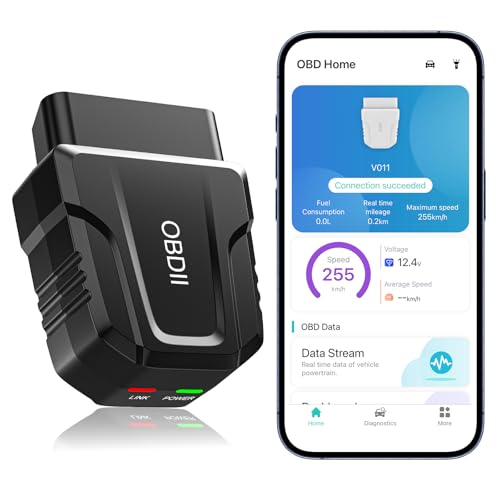
- 【Intuitive Data Visualization】Understanding car diagnostics has never been easier. The V011 OBD2 Scanner displays detected data in clear, easy-to-read charts. Whether it's engine coolant temperature, engine speed, vehicle speed, or control module voltage, the visual representation helps you quickly grasp your car’s status. Even beginners can compare these readings against normal values to determine if their car needs any repairs.
- 【Broad Compatibility】The newly upgraded V011 OBD2 Scanner supports over 96% of car makes and models, making it one of the most versatile diagnostic tools on the market. It is compatible with a wide range of brands including Toyota, Honda, Chevrolet, Ford, Mercedes-Benz, Jeep, BMW, Porsche, Subaru, Nissan, Cadillac, Volkswagen, and Lexus, covering vehicles from 1996 to the present. This ensures that almost any vehicle owner can benefit from its extensive features. The device also supports multiple languages, including English, German, Spanish, Finnish, French, Italian, Dutch, Portuguese, and Chinese, ensuring accessibility for a global audience.
- 【Advanced Bluetooth 5.4 Connectivity】Say goodbye to the hassle of traditional wired connections. The V011 OBD2 Scanner features an upgraded Bluetooth 5.4 system, providing faster and more reliable connections. This seamless connectivity ensures you can start diagnosing your vehicle without any delays.Tips: 1. The car must be started (power on and ignition), 2. The mobile phone Bluetooth is turned on. Note that Apple phones only need to turn on Bluetooth, do not connect Bluetooth in the phone settings to turn on OBD Home, the APP will automatically connect (this product is only suitable for OBD home)
- 【Exclusive Free App】The V011 OBD2 Scanner comes with a dedicated app that enhances its functionality. You can easily download the app by scanning the QR code on the back of the product. This app is tailored for both Android and Apple systems, ensuring compatibility with your smartphone. Ensure that the OBD2 scanner is correctly inserted into your vehicle's OBD interface, and follow the app's instructions for a straightforward setup process. The app is designed to solve compatibility issues across different systems and models, providing a smooth user experience.✅Note: Be sure to turn on Bluetooth when opening the APP link
- 【What’s Included】The V011 Bluetooth Code Reader comes with a detailed manual and access to 24-hour troubleshooting email support. Our dedicated customer service team is always ready to assist you with any issues, ensuring you have a pleasant experience with our product. We are committed to manufacturing our products to the highest quality standards, ensuring they provide both functionality and durability.Note: After using the product, it is recommended to unplug the product to avoid consuming the battery of the car.
Why You'll Love It
- Read engine fault codes, check emission readiness, and retrieve your vehicle's VIN through the dedicated app
- View live engine readings in charts to make vehicle information easier to understand
- Use Bluetooth 5.4 to connect the scanner wirelessly with compatible iOS and Android phones
- Access nine diagnostic protocols, including freeze frame, sensor data, and onboard monitoring
- Get suggested fixes, instructional guides, and video tutorials to help understand diagnostic results
- Clear eligible fault codes and reset monitors after addressing the underlying vehicle problem
Pros
- +Bluetooth 5.4 wireless connectivity
- +Compatible with iOS and Android
- +Live data charts and sensor readings
- +Nine supported diagnostic protocols
- +Dedicated app with instructional guides
Cons
- -Requires the dedicated OBD Home app
- -Fault clearing depends on repairing the underlying problem
- -Needs a smartphone and Bluetooth connection
Detailed Review
The UMEIJA V011 OBD2 scanner is a smartphone-connected diagnostic tool designed for drivers who want to understand check engine warnings without relying entirely on a repair shop to interpret the initial information. It connects to a vehicle through its OBD interface and communicates with an iOS or Android phone using Bluetooth 5.4. Its main appeal is the combination of fault code reading, live vehicle information, and an accompanying app that helps explain what the results may mean. This makes it particularly relevant to everyday drivers who want a clearer starting point when a warning light appears.
Its diagnostic features cover several useful areas. The scanner can read diagnostic trouble codes, retrieve the vehicle identification number, access freeze frame information, and display emission readiness. It also supports monitor resets, onboard monitoring, and fault code clearing when the underlying vehicle problem has been repaired. Nine supported protocols provide the foundation for its diagnostic functions. For someone trying to understand a warning before discussing repairs, having several types of information available in one app can make the process more organized.
Live data visualization is another important part of the package. Rather than presenting every reading as an unexplained figure, the app displays information in charts. Examples include engine coolant temperature, engine speed, vehicle speed, and control module voltage. Drivers can follow these readings and compare them with the normal values presented through the app. The app also offers possible fixes for detected codes, along with how-to guides and video tutorials. These features are intended to make the information more approachable for people who have not previously used a diagnostic scanner.
Connectivity and compatibility are central to the design. Bluetooth 5.4 provides wireless communication, while the dedicated OBD Home app supports Apple and Android phones. The seller lists compatibility with more than 96% of car makes and models, covering vehicles from 1996 to the present, including Toyota, Honda, Ford, Chevrolet, BMW, Mercedes-Benz, Volkswagen, and Nissan. The app also supports multiple languages. Setup involves inserting the scanner into the vehicle's OBD interface, starting the vehicle, enabling phone Bluetooth, and following the app instructions. Apple users should allow the app to connect automatically rather than pairing through the phone's Bluetooth settings.
The main trade-off is that this is an app-dependent diagnostic tool, not a standalone display unit. You need a compatible smartphone, the dedicated application, and an appropriate vehicle connection. Its code-clearing feature also has an important limitation: clearing a warning is not a substitute for repairing the fault. The seller specifically advises unplugging the scanner after use to avoid consuming the vehicle battery.
Verdict: This OBD2 scanner is a sensible option for drivers who want smartphone-based fault code reading, live data charts, and accessible diagnostic guidance in one device. Choose it if the OBD Home app and your vehicle are compatible; consider a standalone diagnostic reader if you would rather not depend on a phone application.
Who Should Buy It
A great fit if you:
- Want to understand a check engine warning before deciding what information to discuss with a repair professional.
- Prefer viewing vehicle information on your iOS or Android phone instead of using a separate display.
- Enjoy keeping track of engine readings such as coolant temperature, engine speed, and vehicle speed.
- Want diagnostic code explanations and suggested fixes to make unfamiliar vehicle information easier to interpret.
- Own a compatible vehicle and want access to emission readiness, freeze frame, and sensor information.
Consider something else if you:
- Prefer a standalone diagnostic scanner with its own screen rather than a smartphone-dependent device.
- Need a diagnostic system designed for specialized vehicle functions beyond the listed engine and onboard diagnostic features.
Before You Buy
Confirm on the listing:
- Check your vehicle's exact make, model, and year against the compatibility information, particularly if it is an older vehicle or an uncommon model.
- Confirm that your smartphone can use the dedicated OBD Home application and that you are comfortable using an app for diagnostic information.
- Review the included manual and product packaging details so you know what comes with the scanner and how to access the QR code for the application.
- Check the available app languages and make sure your preferred language is supported before purchasing.
How to compare your options: Focus on vehicle compatibility, smartphone support, the diagnostic information available, and how results are presented. This model combines code reading, emission readiness, freeze frame information, and live charts with Bluetooth 5.4 connectivity. Consider whether those features match your needs, or whether a standalone reader or a different diagnostic system would better suit your preferred way of working. Also consider whether app-based guidance is more useful to you than simply receiving a fault code.
Getting the Most From It
Start by reading the included manual and following the OBD Home app's setup instructions. Scan the QR code on the back of the product to access the dedicated application, and make sure your phone's Bluetooth is enabled when opening it. The scanner should be correctly inserted into the vehicle's OBD interface before you follow the connection instructions.
The vehicle needs to be started, with the ignition powered on, for the connection process described by the seller. Apple phone users should pay particular attention to the pairing instructions: turn on Bluetooth but do not manually connect the scanner through the phone's Bluetooth settings. The application is designed to establish the connection automatically.
When reviewing diagnostic information, look beyond the fault code itself. Check the available freeze frame details, emission readiness, and live sensor readings to build a clearer picture of the reported issue. The charts can help you follow information such as engine speed, coolant temperature, vehicle speed, and control module voltage.
Use the app's suggested fixes and instructional resources as guidance when interpreting results. Address the underlying vehicle problem before attempting to clear a fault code. After using the scanner, unplug it as recommended by the seller to avoid consuming the vehicle's battery. Keep the manual available for future setup or troubleshooting questions.
FAQ
What comes with the UMEIJA V011 scanner?
The package includes the Bluetooth code reader and a detailed manual. It also provides access to 24-hour troubleshooting email support and the dedicated OBD Home app, which can be downloaded using the QR code on the product.
Does this OBD2 scanner work with iPhone and Android?
Yes, it supports both iOS and Android smartphones. Apple users should enable Bluetooth without manually pairing the scanner in phone settings, allowing the application to connect automatically.
Will it work with my car or truck?
It is listed as compatible with more than 96% of vehicle makes and models from 1996 to the present. Supported examples include Toyota, Honda, Ford, Chevrolet, BMW, Mercedes-Benz, Jeep, and Volkswagen. Check your specific vehicle before purchasing.
Can it turn off the check engine light?
Yes, it supports clearing eligible fault codes and turning off the check engine light after the vehicle problem has been repaired. Clearing a code does not repair the underlying issue, and the seller notes that an unrepaired fault may require attention through a repair shop.
Does it show live vehicle information?
Yes, the app displays live data in charts, including engine coolant temperature, engine speed, vehicle speed, and control module voltage. It also provides access to sensor information, freeze frame data, and emission readiness.
Product Details
| Brand | UMEIJA |
| ASIN | B0D44C1F7Y |