thinkcar
thinkcar AI-Assisted Bidirectional OBD2 Scanner Diagnostic Tool 689BT | 3000+Active Tests, ECU Coding,34+ Services,OE All System, FCA,CAN-FD & DoIP, Bluetooth 5.0 VCI And Lifetime Free WiFi Update
Disclosure: We may earn a commission when you buy through links on this page, at no extra cost to you. As an Amazon Associate I earn from qualifying purchases. Learn more
Highlights
- [Notice] When you receive a used device, it may be a customer return resold by Amazon without inspection. You can exchange it for a new one through Amazon. As this situation is unavoidable, we sincerely apologize. For any issues, contacting us via Amazon's "Messages" is the best way. THINKSCAN 689BT Bidirectional Scan Tool Can Be Used Immediately After It is Turned On, Without Complicated Registration Process, Which is More Convenient & Quick.
- AI-Assisted Diagnosis Upgrade:Connect your THINKSCAN 689BT diagnostic scanner to WiFi and free-upgrade the software to unlock Tyler AI Agent. Get step-by-step diagnostic guidance, illustrated guides, and smart parts recommendations. One tap jumps to Amazon for real-time pricing. Boost efficiency up to 300% and finish jobs faster. Upgrade your shop today.
- Full Bi-Directional Control & 3000+ Active Tests: Take control and test components like actuators, fuel injectors, relays, and cooling fans in real time. You’ll quickly see if the problem is in the part itself or the control module — saving you hours of guesswork and frustrating trial-and-error.
- Advanced ECU Coding Capabilities: Handle module matching and hidden feature activation with confidence. When you replace an ECU or want to customize settings, this obd2 scanner diagnostic bi directional tool gives you the professional-level capabilities you need without the dealership price tag.
- 34+ Useful Reset and Maintenance Functions: Complete everyday service tasks smoothly with a wide range of helpful reset and maintenance functions. Whether you’re keeping up with regular upkeep or tackling a specific job, this car scanner diagnostic tool makes maintenance simpler and less stressful for both DIYers and pros.
- Comprehensive Full System Diagnostics: Diagnose every major system — Engine, Transmission, ABS, SAS, TPMS, and more — all in one place. Finally stop wondering if you’re missing something important; get the full picture and clear codes with ease.
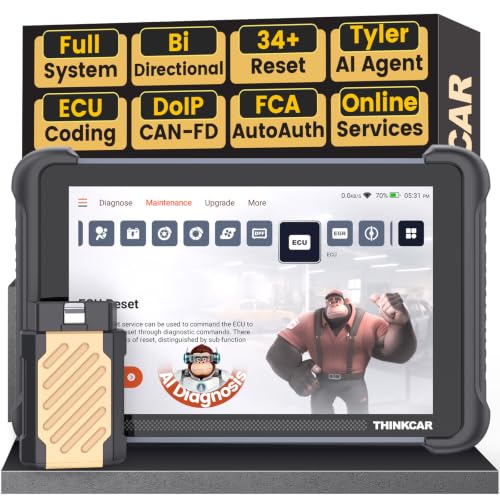
- Fast Performance & User-Friendly Design: An 8-inch HD touchscreen, powerful quad-core processor, and smooth Android 10 system give you responsive, tablet-like performance. No more waiting or struggling with slow tools — just plug in and get to work comfortably.
Why You'll Love It
- Control supported vehicle components directly to help identify whether a fault involves a part or its control module
- Access more than 3,000 active functions for detailed vehicle diagnostics and component control
- Use ECU coding for module matching and activation of available vehicle features
- Handle routine maintenance with more than 34 reset and service functions
- Scan major vehicle systems, including engine, transmission, ABS, SAS and TPMS
- Get AI-assisted diagnostic guidance through WiFi, with illustrated instructions and parts recommendations
Pros
- +Full-system vehicle diagnostics
- +Bidirectional component control
- +ECU coding capabilities
- +34+ maintenance functions
- +AI-assisted diagnostic guidance
Cons
- -Advanced functions require vehicle compatibility
- -AI features require a WiFi software upgrade
Detailed Review
The thinkcar 689BT is a bidirectional OBD2 scanner aimed at vehicle owners and automotive professionals who want more than basic fault-code reading. Its main appeal is the combination of full-system diagnostics, direct component control, ECU coding and maintenance functions in one diagnostic tool. Rather than focusing only on identifying a warning or retrieving a fault code, it gives users access to additional functions that can help investigate problems and carry out selected vehicle service tasks.
Bidirectional control is one of its most significant capabilities. The scanner supports more than 3,000 active functions, allowing users to command supported components such as fuel injectors, actuators, relays and cooling fans. This can help narrow down whether a suspected problem involves the component itself or its control module. For someone who regularly works through vehicle faults, that distinction is useful because it gives the diagnostic process a more direct direction instead of relying entirely on code interpretation.
Another important feature is ECU coding. The 689BT supports module matching and activation of hidden vehicle features, making it relevant to buyers who handle module replacement or want to customize available settings. Its full-system diagnostic coverage also extends across major areas including the engine, transmission, ABS, SAS and TPMS. More than 34 reset and maintenance functions add everyday service capabilities, so the device can serve both diagnostic and routine maintenance needs.
The hardware and software are designed around a tablet-style interface. An 8-inch HD touchscreen, quad-core processor and Android 10 system provide the operating environment, while Bluetooth 5.0 connects the VCI. The scanner can be used after switching it on without a complicated registration process. WiFi software updates are described as free for the lifetime of the product, and connecting to WiFi also enables an upgrade for the Tyler AI Agent, which provides step-by-step diagnostic guidance, illustrated instructions and parts recommendations.
There are practical considerations alongside this broad feature set. Advanced coding and component-control functions are not automatically suitable for every vehicle, so buyers need to establish compatibility with their particular model and intended job. The AI assistance also involves connecting to WiFi and upgrading the software. This is a feature-rich diagnostic device, but its range of functions makes choosing the right vehicle applications especially important. Verdict: The 689BT is worth considering for experienced DIY vehicle owners, repair professionals and anyone who regularly needs system diagnostics, component control or ECU coding. Buyers who only want straightforward fault-code reading may find a simpler OBD2 scanner more appropriate.
Who Should Buy It
A great fit if you:
- You regularly diagnose vehicle problems and want access to multiple systems rather than concentrating only on engine fault codes.
- You work with components such as cooling fans, relays and fuel injectors and want direct control during diagnostic procedures.
- You replace vehicle control modules and need ECU coding or module matching as part of your work.
- You maintain vehicles regularly and would benefit from having numerous reset and maintenance functions available in one device.
- You appreciate guided diagnostic assistance and would use WiFi features to access illustrated instructions and parts recommendations.
Consider something else if you:
- You only need to retrieve and clear basic engine codes, in which case a simpler code reader may better match your requirements.
- You want a straightforward diagnostic device without coding or advanced component controls, so a basic OBD2 scanner may be a more suitable alternative.
Before You Buy
Confirm on the listing:
- Check whether your specific vehicle make, model and year support the diagnostic, bidirectional and ECU coding functions you intend to use.
- Verify that the particular reset and maintenance functions you need are available for your vehicle, rather than assuming every function applies universally.
- Check what is included in the package, particularly the VCI and any accessories or documentation you expect to receive.
- Confirm that you have access to WiFi for software updates and the upgrade needed to unlock the Tyler AI Agent.
How to compare your options: For an OBD2 scanner, prioritize the diagnostic systems, vehicle compatibility and advanced functions you actually plan to use. The 689BT combines full-system coverage, more than 3,000 active functions, ECU coding and over 34 service functions. Compare those capabilities against your typical repair tasks rather than choosing a scanner based on the number of advertised features alone. If you mainly retrieve basic codes, prioritize simplicity instead. If module matching, component control and guided diagnostics matter to you, give those capabilities greater weight in your decision.
Getting the Most From It
Start by switching on the scanner and becoming familiar with its touchscreen interface. The device is designed for use without a complicated registration process, so you can begin by exploring its available diagnostic functions. If instructions are supplied with your device, review them before attempting unfamiliar operations.
Connect the scanner to WiFi when you are ready to update its software. The seller describes lifetime free WiFi software updates, and the WiFi connection is also needed to upgrade the software and unlock the Tyler AI Agent. Explore the illustrated guidance and diagnostic recommendations once that feature is available.
Choose diagnostic functions according to the vehicle and the problem you are investigating. Full-system scanning can help you examine the engine, transmission, ABS, SAS and TPMS, while bidirectional controls can help investigate supported components. Check vehicle compatibility before relying on an advanced function, especially when working with ECU coding or module matching.
For routine vehicle upkeep, become familiar with the available reset and maintenance options. Keep the scanner's software updated and follow the device instructions for operation and care. Using the functions that match the job at hand makes its broad feature set easier to navigate and more useful over time.
FAQ
Can the thinkcar 689BT control vehicle components?
Yes, it supports bidirectional control and more than 3,000 active functions. Supported components include actuators, fuel injectors, relays and cooling fans, allowing users to investigate component and control-module problems.
Does this OBD2 scanner support ECU coding?
Yes, ECU coding is one of its listed capabilities. It supports module matching and activation of hidden vehicle features, subject to the relevant vehicle's compatibility.
Does it diagnose ABS and transmission problems?
Yes, its full-system diagnostic coverage includes the engine, transmission, ABS, SAS and TPMS, along with other major vehicle systems.
Does the AI diagnostic assistant come ready to use?
The Tyler AI Agent requires a WiFi connection and a free software upgrade to unlock. Its features include step-by-step diagnostic guidance, illustrated instructions and parts recommendations.
What comes with the scanner?
The product description identifies Bluetooth 5.0 VCI connectivity and an 8-inch touchscreen scanner. Check the package details on the Amazon listing to confirm the complete included-accessory list before ordering.
Product Details
| Brand | thinkcar |
| ASIN | B0GWZ44YRR |